用户
查看所有用户
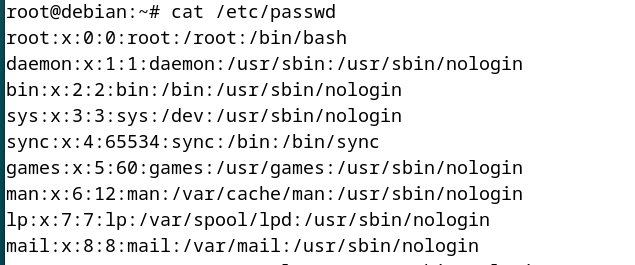
查看系统中注册的用户可以通过以下命令:
cat /etc/passwd
每一行的字段含义为:
用户名:密码:用户ID:组ID:注释:主目录:登录 shell
root:用户名。x:密码占位符(实际密码存储在/etc/shadow)。0:用户 ID (UID),0是超级用户。0:组 ID (GID),表示这个用户所属的初始组。root:注释,通常用于描述该账户。/root:主目录。/bin/bash:默认登录 shell。
添加新用户
最简单的方式:
adduser username
可以指定更多信息,例如:
sudo adduser --uid 1001 --gid 100 --groups sudo,adm --home /home/mycustomhome --shell /bin/bash --comment "My Custom User" myuser
选项说明:
--gid:指定初始组。--groups:让该用户加入多个组。--home:自定义主目录。--shell:登录 shell,可以是/bin/bash、/usr/sbin/nologin等。--comment:用户描述。
创建 newuser 时,系统会自动为其新建同名用户组,cat /etc/group 可以查看所有组。
示例输出:
root@debian:~# adduser zzz
Adding user `zzz' ...
Adding new group `zzz' (1002) ...
Adding new user `zzz' (1002) with group `zzz (1002)' ...
Creating home directory `/home/zzz' ...
Copying files from `/etc/skel' ...
New password:
Retype new password:
passwd: password updated successfully
Changing the user information for zzz
Enter the new value, or press ENTER for the default
    Full Name []:
    Room Number []:
    Work Phone []:
    Home Phone []:
    Other []:
Is the information correct? [Y/n]
Adding new user `zzz' to supplemental / extra groups `users' ...
Adding user `zzz' to group `users' ...
删除用户
deluser username
默认情况下,如果该组没有其它用户,deluser 会一并删除该组。
示例:
root@debian:~# deluser zzz
Removing crontab ...
Removing user `zzz' ...
Done.
root@debian:~#
组
查看组
查看当前用户所属于的组:
groups
示例:
root@debian:~# groups
root
root@debian:~# ^C
查看系统所有组:
cat /etc/group
输出示例(省略部分):
root:x:0:
daemon:x:1:
bin:x:2:
sys:x:3:
adm:x:4:
tty:x:5:
disk:x:6:
lp:x:7:
mail:x:8:
news:x:9:
uucp:x:10:
man:x:12:
...
Debian-gdm:x:121:
hzl:x:1000:
gnome-initial-setup:x:995:
hhh:x:1001:
添加组
addgroup groupname
示例:
root@debian:~# addgroup hans_group
Adding group `hans_group' (GID 1002) ...
Done.
root@debian:~#
添加用户到组
usermod -aG groupname username
该命令在不移除原有组的前提下,把 username 加入指定组。
删除组
delgroup groupname
示例:
root@debian:~# delgroup hhh
Removing group `hhh' ...
groupdel: cannot remove the primary group of user 'hhh'
delgroup: `/sbin/groupdel hhh' returned error code 8. Exiting.
root@debian:~# delgroup hans_group
Removing group `hans_group' ...
Done.
root@debian:~#
权限
权限类型
Linux 文件和目录的权限分为三种类型:
- 读取(r):允许查看文件内容或列出目录。
- 写入(w):允许修改文件或在目录中添加/删除条目。
- 执行(x):允许执行文件或访问目录。
权限分配
- 所有者(Owner):通常是文件创建者。
- 用户组(Group):与所有者同组的用户集合。
- 其他用户(Others):系统中的其他人。
权限表示
-rwxr-xr--
- 第一个字符表示文件类型(
-表示文件,d表示目录)。 - 后续九个字符分为三组三个:所有者、组、其他用户。
rwx:所有者的权限(读、写、执行)。r-x:组的权限(读、无写、执行)。r--:其他用户的权限(只读)。
查看文件权限
ls -l
示例:
hzl@debian:~/Desktop$ ls -l
total 36
drwxr-xr-x 2 hzl  hzl   4096 May  6 07:03 fenjiduan
-rwxr-xr-x 1 hzl  hzl  16552 May  6 06:36 hello_world
-rw-rw-rw- 1 root root    84 May  6 06:33 hello_world.cpp
drwxr-xr-x 2 hzl  hzl   4096 May  6 07:56 maketest
drwxr-xr-x 2 hzl  hzl   4096 May  6 06:45 multifile
hzl@debian:~/Desktop$
修改文件权限
chmod u+x filename
chmod g-w filename # 从组去除写权限
chmod o+x filename
使用数字方式设置权限:
rwx 111 7
r-x 101 5

chmod 755 filename # 所有者读写执行,组和其他用户读执行
改变所有者和组
chown newowner filename

chown :newgroup filename