MySQL 数据库基础
基本操作
初始化
mysqld --initialize-insecure  //data 文件夹

mysqld -install // 安装服务

net start mysql // 启动服务
修改默认密码
mysqladmin -u root password 1234
登录
mysql -uroot -p1234 [-hlocalhost -P3306] //可选
登录docker Desktop 将 内部3306 映射到外部的 3305
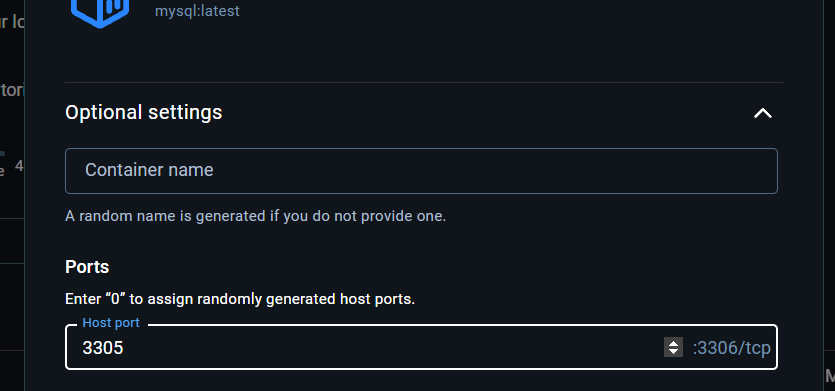
mysql -P3305 -uroot -phzl
库
create database db01;

show databases;

select database(); //显示当前数据库

use db01;

drop database if  exists db02;
单表
表
约束
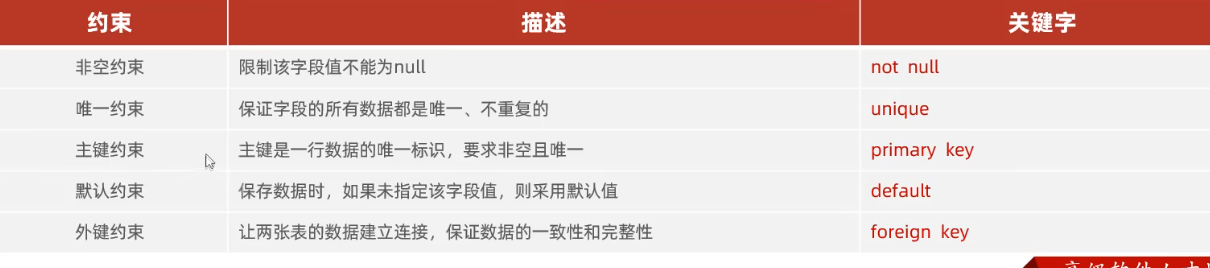 还有 auto_increment
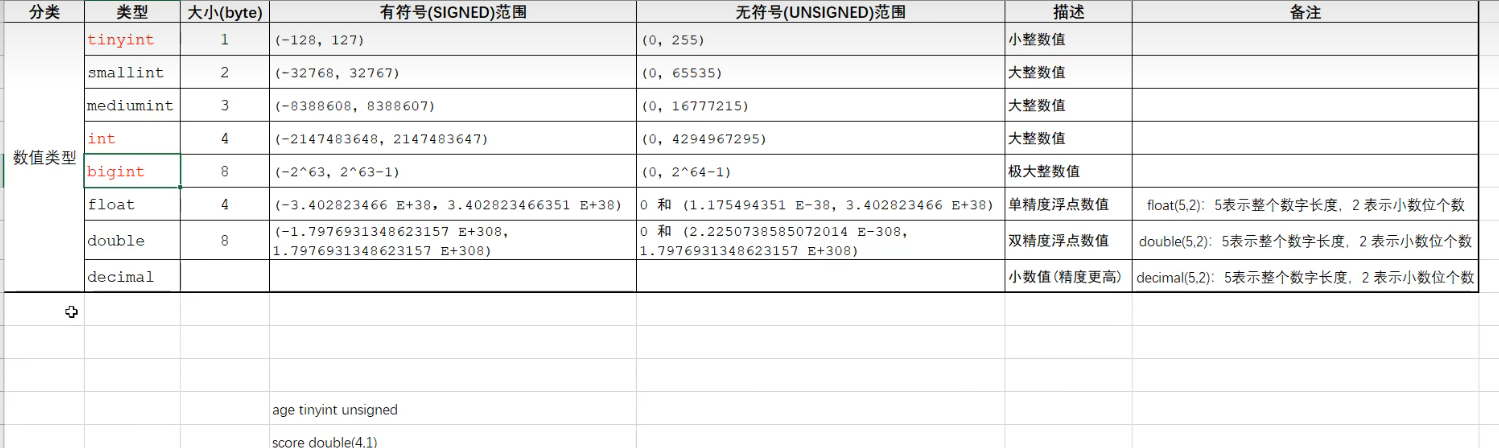
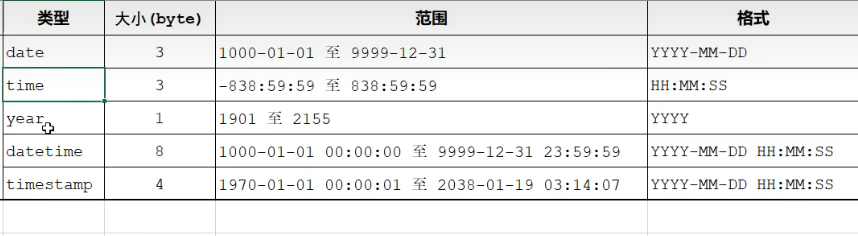
数据类型
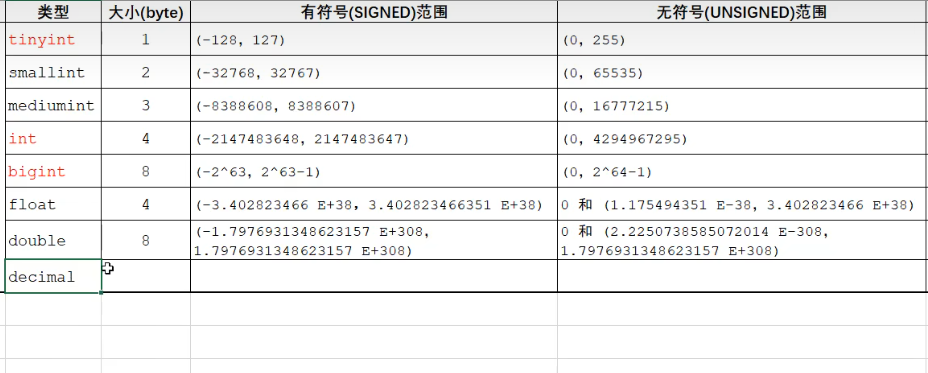
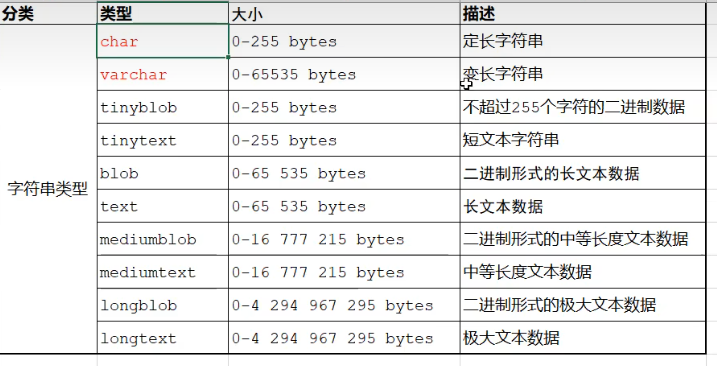
- char(10) 一定是10个字符
- varchar(10)最多存10个, 小于10时按实际长度存储.
create table tb_user(
    id int comment '唯一id',
    username varchar(20) comment '用户名',
    name varchar(10) comment '姓名',
    age int comment '年龄',
    gender char(1) comment '性别'
) comment '用户表';


create table tb_user(
    id int primary key auto_increment comment '唯一id',
    username varchar(20) not null unique comment '用户名',
    name varchar(10) not null comment '姓名',
    age int comment '年龄',
    gender char(1) default '男' comment '性别'
) comment '用户表';
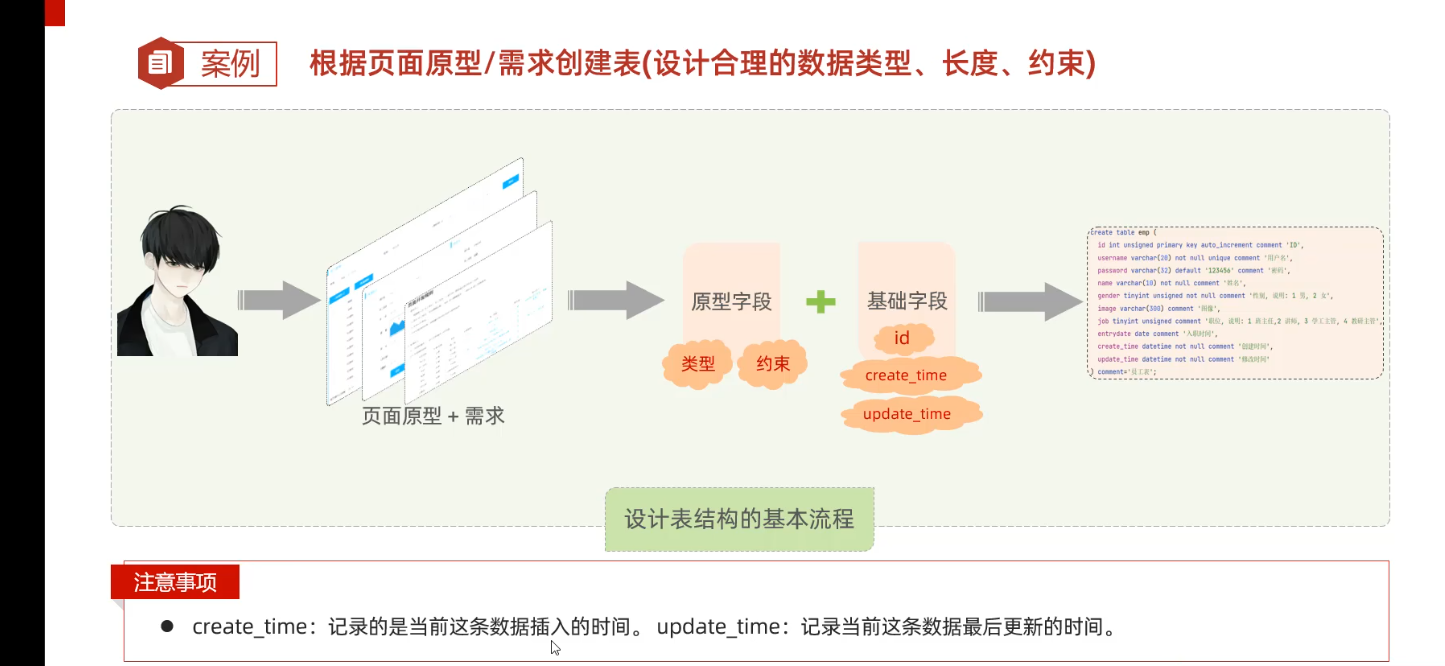
示例
常见操作
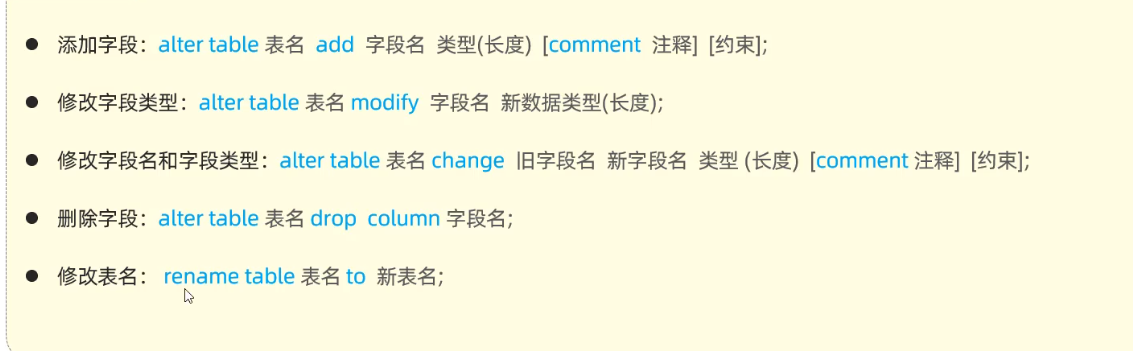
drop table tb_user;

desc tb_emp; //展示表结构

show create table tb_emp; //展示建表语句
增删改
insert
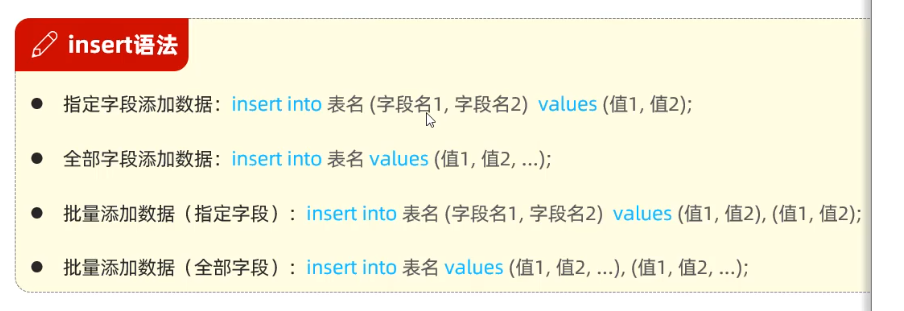
insert into tb_emp(username, name, gender ,createDate,updateTime)
values('wuji','wujiname',1,now(),now());

insert into tb_emp values(null,'zhiruo','123','周芷若',1,'1.jpg',
                          1,'2020-1-1',now(),now());

insert into tb_emp(username, name, gender ,createDate,updateTime)
values('LiMing','liming',1,now(),now()),
      ('xiaohong','xiaohong',2,now(),now());
update

update tb_emp set name = '张三' ,updateTime = now() where id=1;
delete

delete from tb_emp where id = 1;

-- 删除整个表中内容
delete from tb_emp;
查
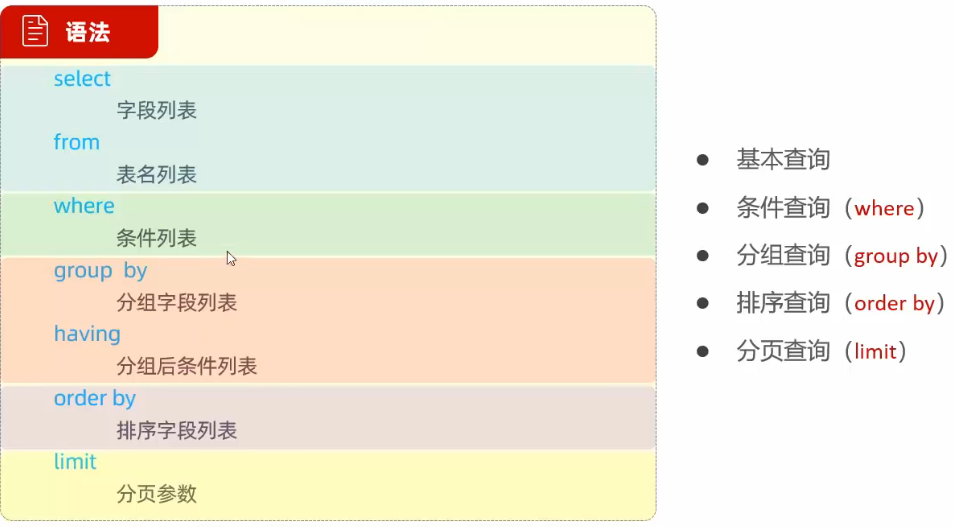
select from
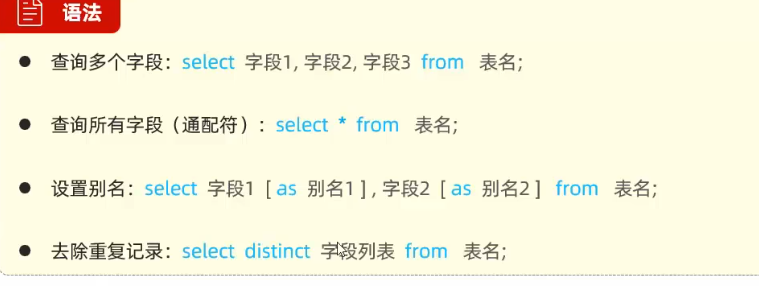
where
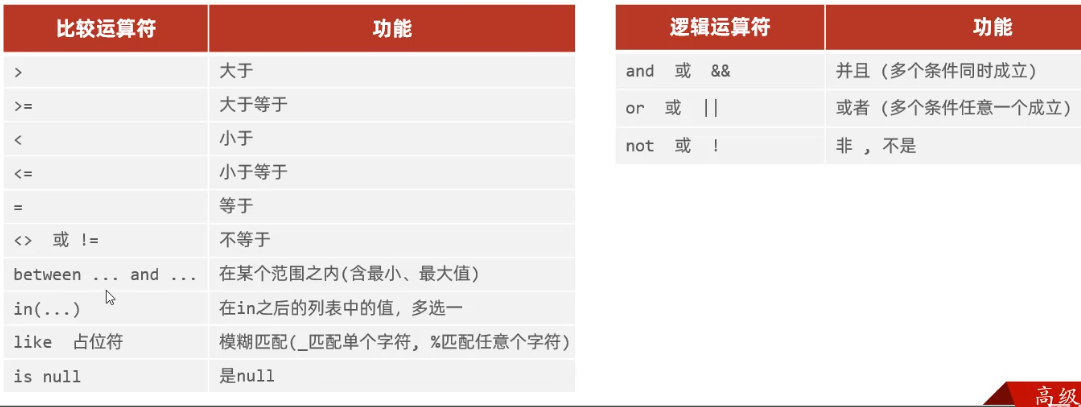
select * from tb_emp where name = '杨逍';
select * from tb_emp where id<=5;
select * from tb_emp where job is null;
select * from tb_emp where job is not null;
select * from tb_emp where password!='123456';
select * from tb_emp where entrydate>='2000-1-1' and entrydate<='2010-1-1';
select * from tb_emp where entrydate between '2000-1-1' and '2010-1-1';
select * from tb_emp where entrydate between '2000-1-1' and '2010-1-1' and gender = 2;
select * from tb_emp where job in (2,3,4);
-- 两个字的员工
select * from tb_emp where name like '__';
select * from tb_emp where name like '张%';
聚合函数
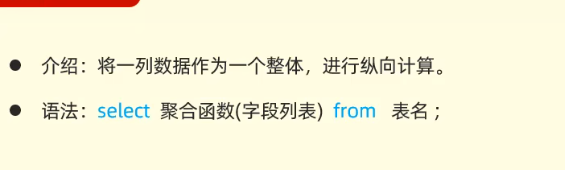
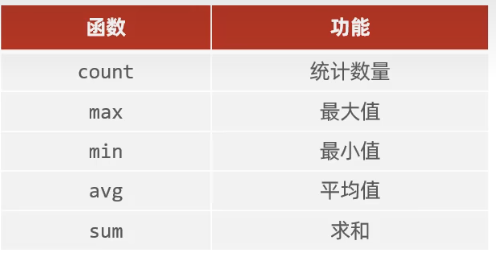
select count(id) from tb_emp;
-- null 不被count 计算, 因此一般选择非空常量.
select count(job) from tb_emp;
select count('A') from tb_emp;
select count(*) from tb_emp; 推荐count(*)
分组 group having
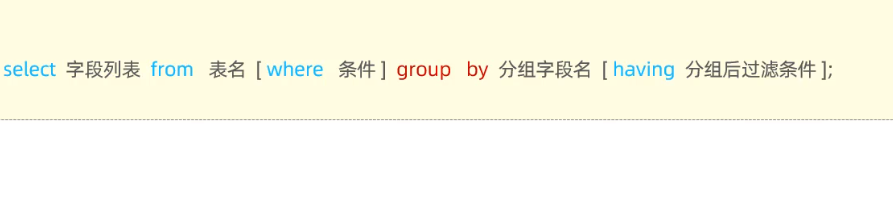
- 分组之后, 只能返回分组字段或聚合函数,
- 比如
select gender,name from table group by name是错误的, 一旦加上group by,select字段只能是 被分组字段或者是其余字段的聚合函数.
- 比如
select gender,count(*) from tb_emp group by gender;
select job,count(*) from tb_emp where entrydate<='2015-1-1' group by job having count(*)>=2;
order by

- ASC 升序
- DESC 降序
select * from tb_emp order by entrydate;
select * from tb_emp order by entrydate desc;
-- 入职时间升序, 入职时间相同按更新时间降序;
select * from tb_emp order by entrydate,update_time desc;
limit

- 起始索引 从0开始;
select * from tb_emp limit 0,5;
select * from tb_emp limit 5,5;
多表
约束
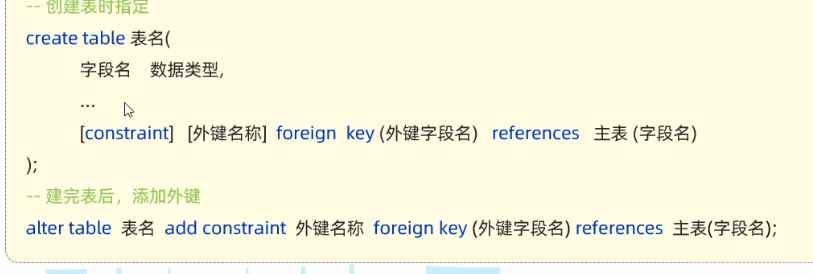
- 一对多的关系, 在多的一方添加外键关联一的主键. 例如部门表和员工表, 一个部门有多个员工, 应在员工表添加外键关联部门表id.
alter table tb_emp
    add constraint tb_emp_tb_dept_id_fk
        foreign key (dept_id) references tb_dept (id);
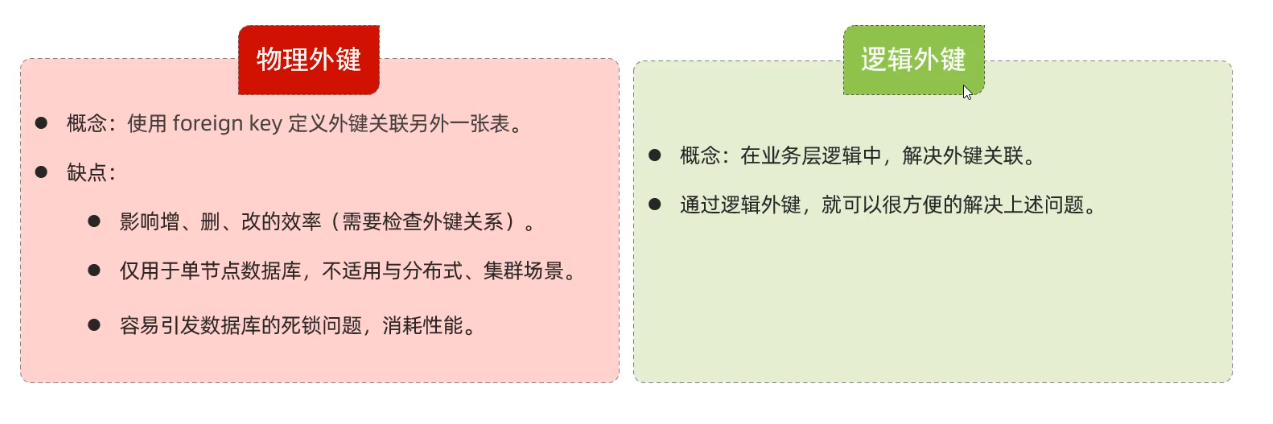
- 使用代码保证数据一致性.
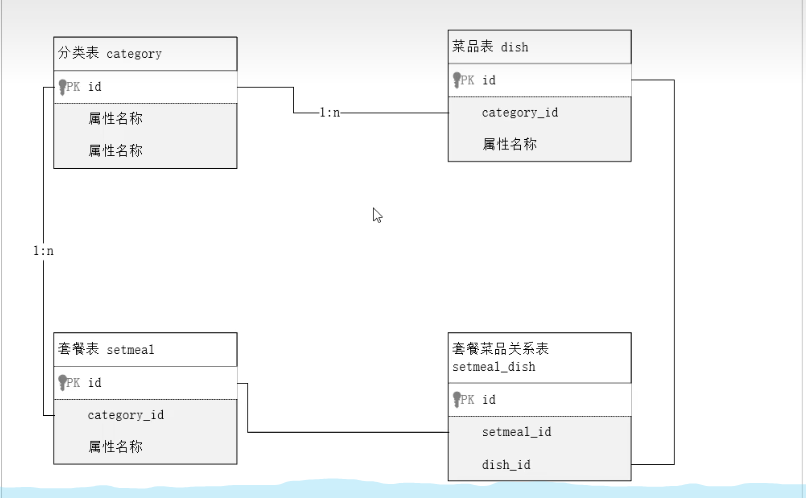
建表
- 设计: 套餐表和菜品表是多对多, 因此使用另外一张表记录.
查询
内连接
- 如果表A中为null, 那么交集中不会有这条数据 , 想包含某表的所有数据(包含null) 要使用外连接.
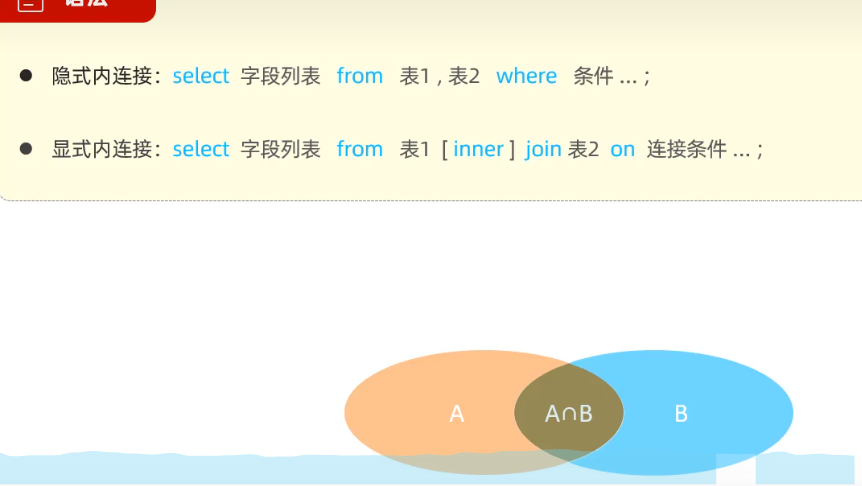
select tb_emp.name,tb_dept.name from tb_dept,tb_emp where tb_emp.dept_id=tb_dept.id;
select tb_emp.name,tb_dept.name from tb_dept inner join tb_emp on tb_emp.dept_id=tb_dept.id;
- 某人 的dept_id为null, 该数据不会被查询到.
外连接
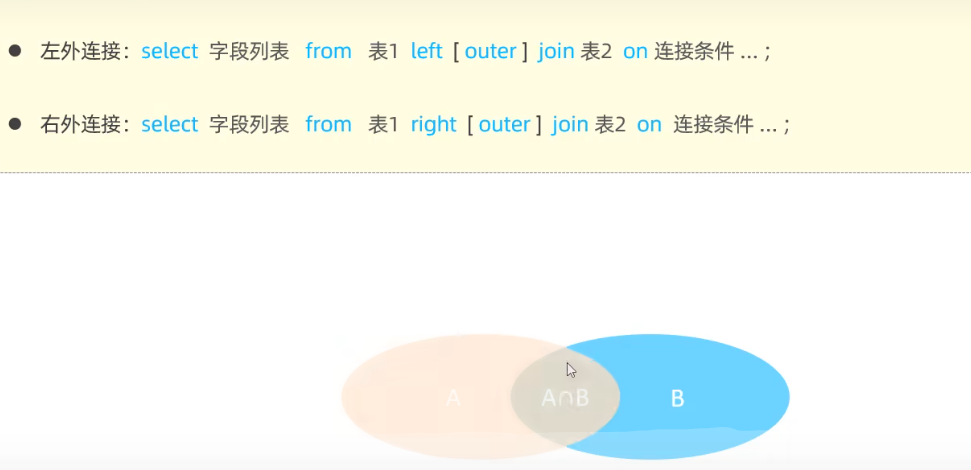
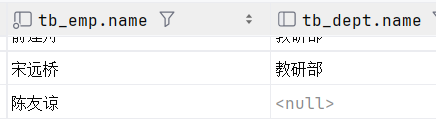
select tb_emp.name,tb_dept.name from tb_emp left outer join tb_dept on tb_emp.dept_id=tb_dept.id;
-- 如下, 做表完全存在.
子查询
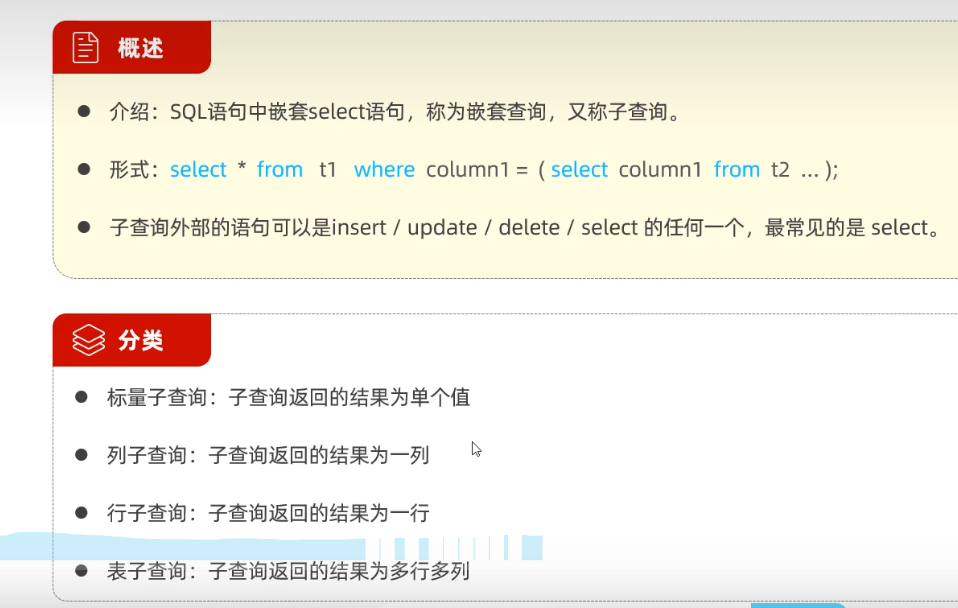
标量子查询
- 返回是一个数, 用>, <, =, != 连接
select * from tb_emp where dept_id  = (select id from tb_dept where name = '教研部');
select * from tb_emp where entrydate>(select entrydate from tb_emp where name = '方东白');
列子查询
- 返回一个列, 用 in, not in 连接
-- 列子查询
-- 查 教研部和咨询部的员工
select * from tb_emp where dept_id in(select id from tb_dept where name ='教研部' or name = '咨询部');
行子查询
- 返回值是一行(可以是多列); 使用 < > = in not in 连接.
-- 行子查询
-- 查询与 韦一笑 入职日期和职位都相同的
select entrydate,job from tb_emp where name = '韦一笑';
select * from tb_emp where (entrydate , job)  = (select entrydate,job from tb_emp where name = '韦一笑');
表子查询
- 多为临时表, 在from之后. 使用in连接;
-- 查询入职日期是 2006-01-01 之后的员工信息和职位名称
select * from tb_emp where entrydate>'2006-01-01';
select e.*,tb_dept.name from (select * from tb_emp where entrydate>'2006-01-01') e,tb_dept
where e.dept_id = tb_dept.id;
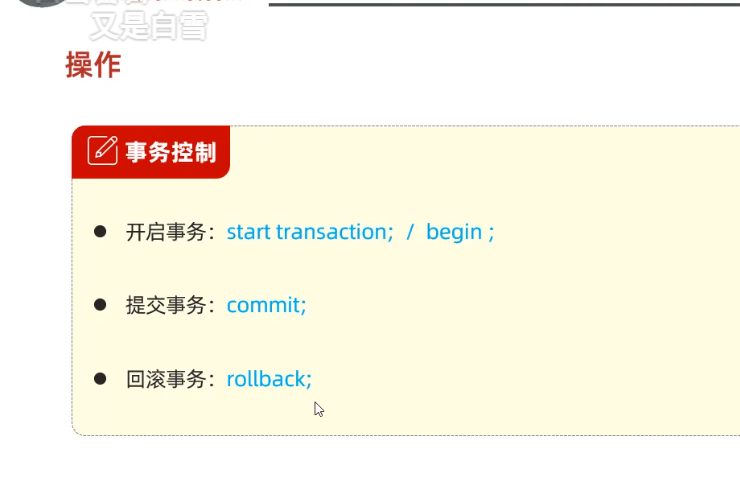
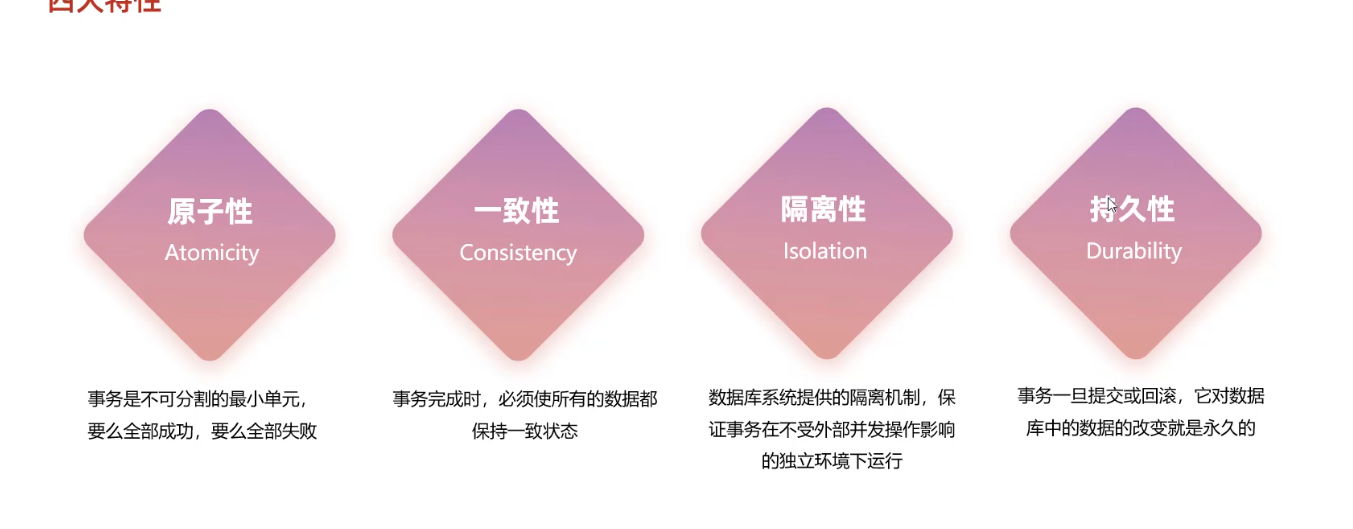
事务
索引
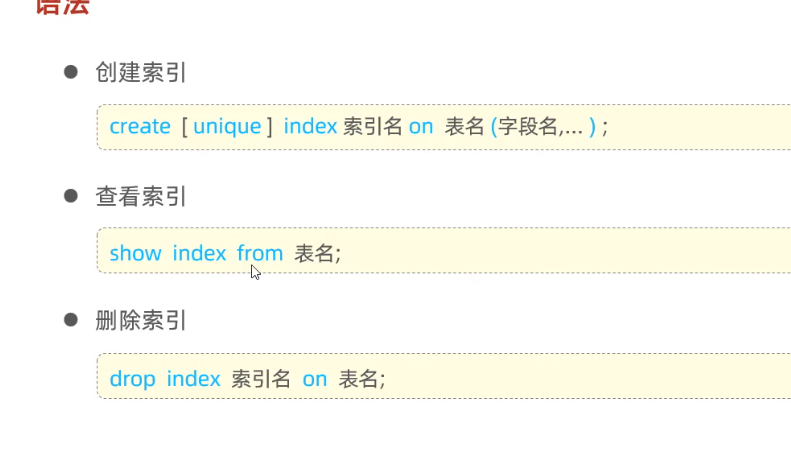
create index index_name on table(column);
6000000 条数据
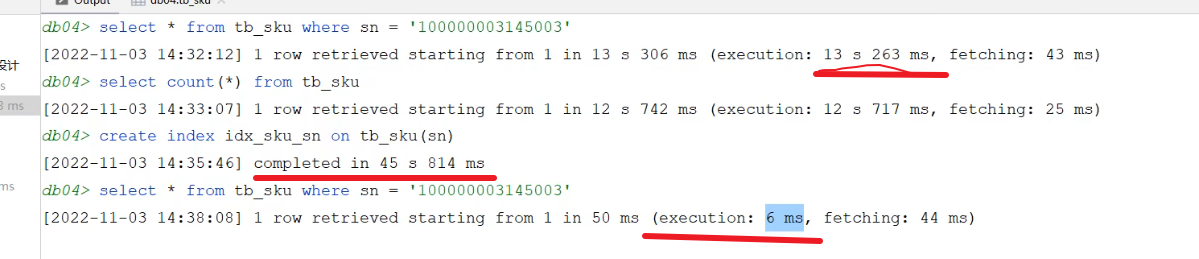
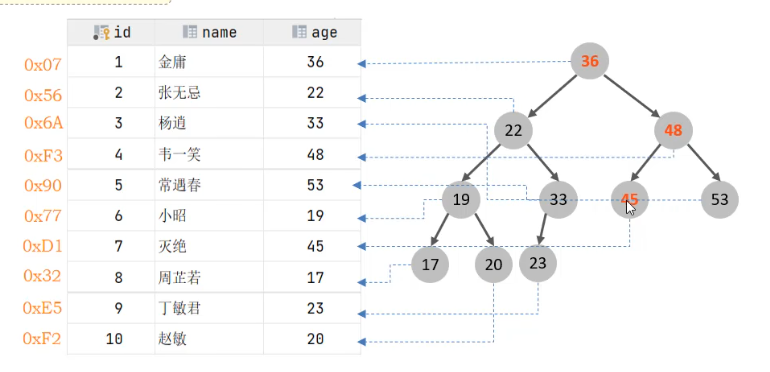
- 没创建索引时是全表扫描,
- 有索引时,是树形结构 实际是 B+树.
- 创建索引后 存在/data/datebase_name/table_name.idb, 索引和数据库文件是一起存放的. 会占用空间.
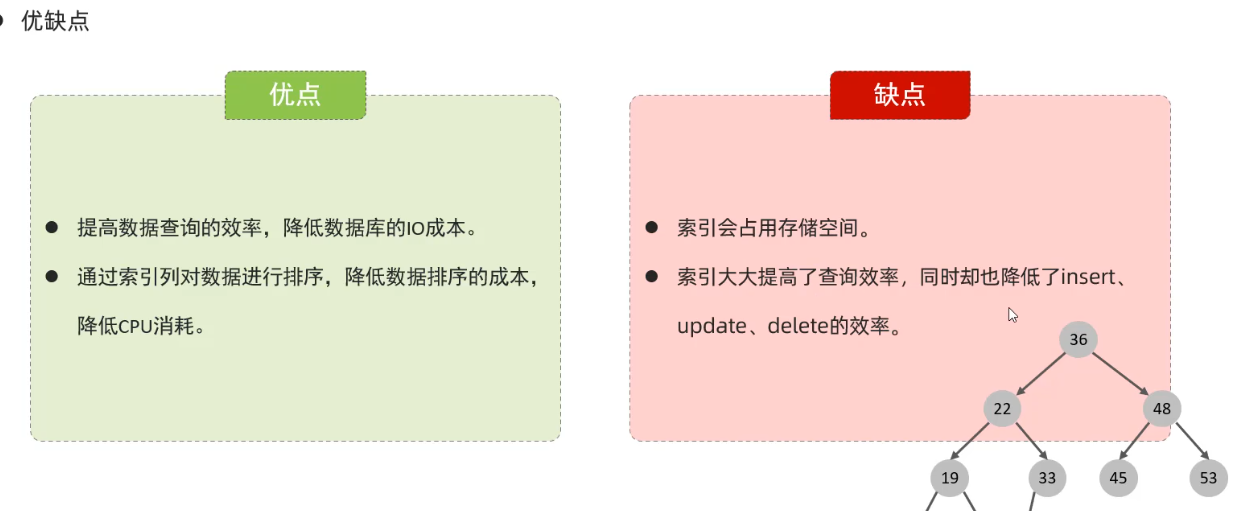
- 增删改时要维护数据结构.
B+树
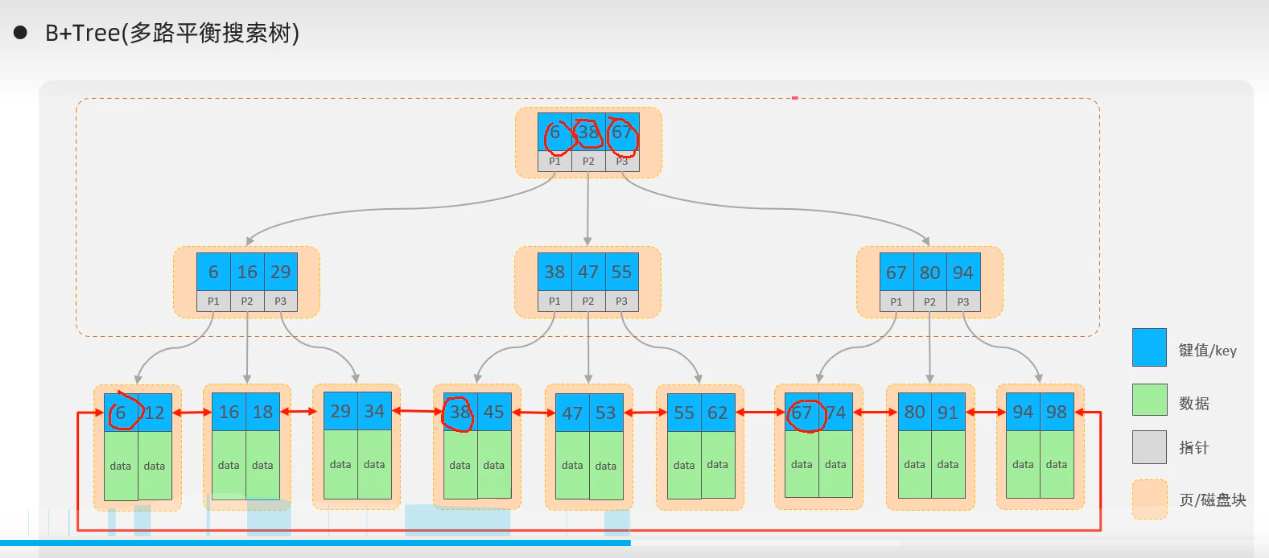
- 数据只存在叶子节点
- 叶子节点双向循环链表.
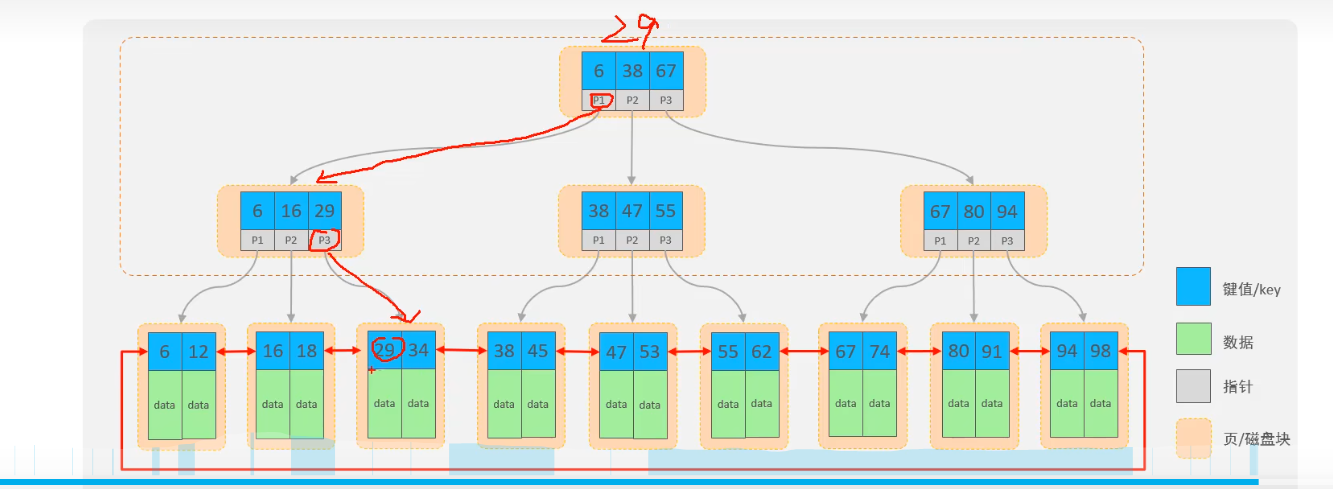
查找过程
- 查找 29 , 进行3次磁盘io即可.
语法